The SUMINWORDS() function is designed to convert an amount or a number written in digits into text.
Quite often, for accounting purposes, the cost of a trade transaction needs to be written in words. For example, to display the amount 10 568,23 in words as "Десять тисяч п'ятсот шістдесят вісім гривень 23 копійки", that is, the amount in words in Ukrainian is required, but in Excel (LibreOffice Calc) there is no standard function for such purposes.
Amount: Amount or number to be converted into text.
[LangCode]: (Optional) Text language in the form of a two-letter code. Three languages are available: "UK" - Ukrainian, "RU" - Russian and "EN" - English.
[CurrCode]: (Optional) Currency in the form of a three-letter code. Three currencies are available: "UAH" - hryvnia, "RUB" - ruble and "USD" - dollar.
[Modifier]: (Optional) Show only the integer part: No (0) or Yes (1).
[AltCurr]: (Optional) Alternative name of the integer part with spelling options in singular, plural, and intermediate forms, separated by a semicolon ("peso;pesos").
[AltFract]: (Optional) Alternative name of the fractional part with spelling options in singular, plural, and intermediate forms, separated by a semicolon ("centavo;centavos").
Usage Example
Example 1
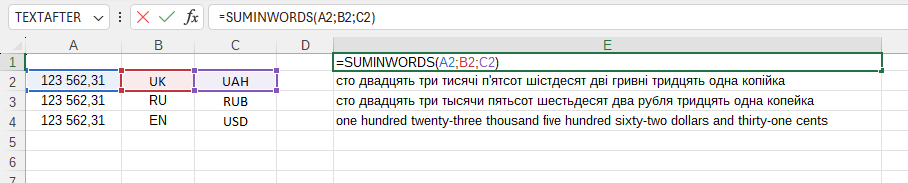
The SUMINWORDS() function is easy to use. Simply enter any number into the formula, specify the language in which you want to display the number, and indicate the currency of the money amount, and Excel (Calc) will automatically convert it into text:
=SUMINWORDS(Amount; LangCode; CurrCode)
We will have the following result:
In this example, the following values are used:
Amount:A2 - The amount to be converted into text (123562,31).
LangCode:B2 - Ukrainian language in the form of a two-letter code ("UK").
CurrCode:C2 - Ukrainian hryvnia in the form of a three-letter code ("UAH").
Example 2
In this example, the following values are used:
Amount:A2 - The amount to be converted into text (24521,12).
LangCode:B2 - Ukrainian language in the form of a two-letter code ("UK").
CurrCode:C2 - Ukrainian hryvnia in the form of a three-letter code ("UAH").
Modifier:D2 - Display integer and fractional parts (0).
AltCurr:E2 - Alternative name of the integer part ("грн.").
AltFract:F2 - Alternative name of the fractional part ("коп.").
Example 3
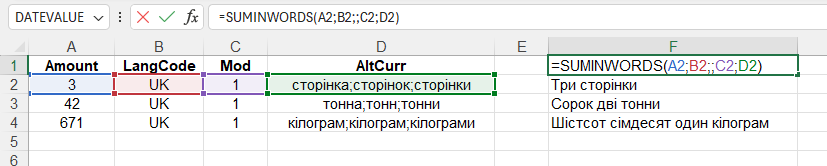
In this example, the following values are used:
Amount:A2 - The number to be converted into text (3).
LangCode:B2 - Ukrainian language in the form of a two-letter code ("UK").
Modifier:C2 - Display only the integer part (1).
AltCurr:D2 - Alternative name of the integer part with spelling options in singular, plural, and intermediate forms ("сторінка;сторінок;сторінки").