Many people use colors to mark cells. Working with cell colors can facilitate understanding data in a workbook Excel (Calc).
Unfortunately, Excel (Calc) does not have built-in functions for using cell colors as conditions in formulas. Building formulas that only count or sum cells of certain colors can become truly cumbersome. This often leads to complex formulas that are prone to errors when changes are made.
The COUNTBYCELLCOLOR() function counts the number of cells that have a specific fill color.
Key Features of the COUNTBYCELLCOLOR Function
Syntax:
=COUNTBYCELLCOLOR(RangeToCount; SampleCell)
Parameters:
RangeToCount: The range of cells to count.
SampleCell: The cell that contains the sample color.
Example Usage
The COUNTBYCELLCOLOR() function is easy to use. You just need to specify the desired range of cells to count and indicate the cell that contains the template of the required color, and Excel (Calc) will automatically count the number of cells with the same color:
=COUNTBYCELLCOLOR(RangeToCount; SampleCell)
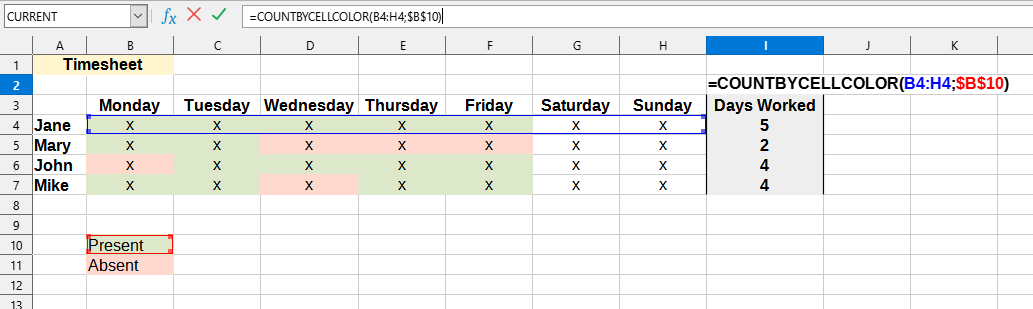
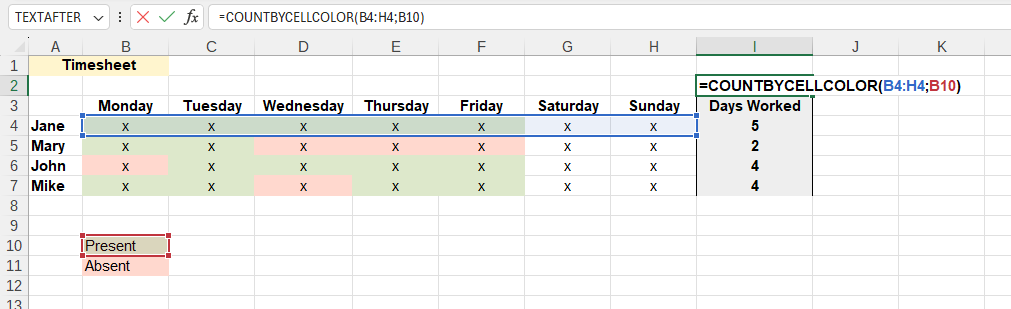
We will get the following result:
The following values are used in this example:
RangeToCount:B4:H4 - Range of cells that contain marks for worked days.
SampleCell:B10 - The cell that contains the required color (green).
Do you recognize any of these situations?
Not sure if YLC has this function, but it would be useful to be able to count colored cells in a range. Say I have 17 pink cells in the range B1:B500. I need a formula that would count these 5 pink cells, even if they have no text or data.
Can color be used as a COUNTIF condition? I have a column where I need to count the number of yellow cells.
I noticed that in recent versions of Excel (Calc) you can sort by cell and font color. What about the function Excel (Calc)? Can formulas also work with cell and font colors?
How to count or sum cells by their fill or background color? It seems that Excel (Calc) does not have a formula that would allow counting or summing a range of cells based on the specified background color.
Several of my colleagues tracked their work by manually coloring cells depending on who performed a specific task (e.g., John colors the cells he worked on blue, Susan red, Daniel his yellow).
I need to get the total count of each color. I'm looking for something automated so we don't have to sort by color every time to get a summary. It seems the problem is that they manually color the cells, so there are no criteria to base the sum on, other than colors.
Notes on Calculation
Since Excel (Calc) recalculates a formula only if the value in the cell (to which it refers) changes, and not when colors change, some sheet formulas do not always run to update. In this case, you can use the F9 or Ctrl+Alt+F9 key combination to update formulas in YLC Utilities.