TOP

Automatic date conversion

Date > Auto date conversion

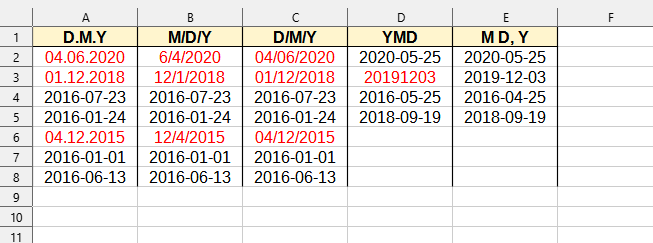
This tool automatically recognizes various date formats that might have been entered as text, and converts them into actual numerical date values that Excel (Calc) can use for calculations and sorting.

This is useful when you import data from external sources where dates are often represented as plain text and require manual conversion or complex formulas for their correct use. The tool simplifies the process, ensuring that your dates are properly formatted for use in a spreadsheet.
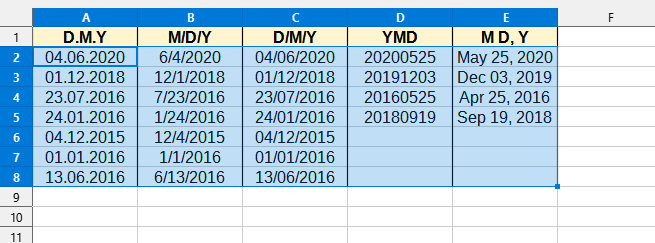

If the tool cannot recognize certain dates (for example, 10-12-2025 may be interpreted as December 10 or October 12), they are highlighted in red for further manual clarification by the user.

Screenshot

Date > Auto date conversion

After applying:

Date > Auto date conversion

Running this tool

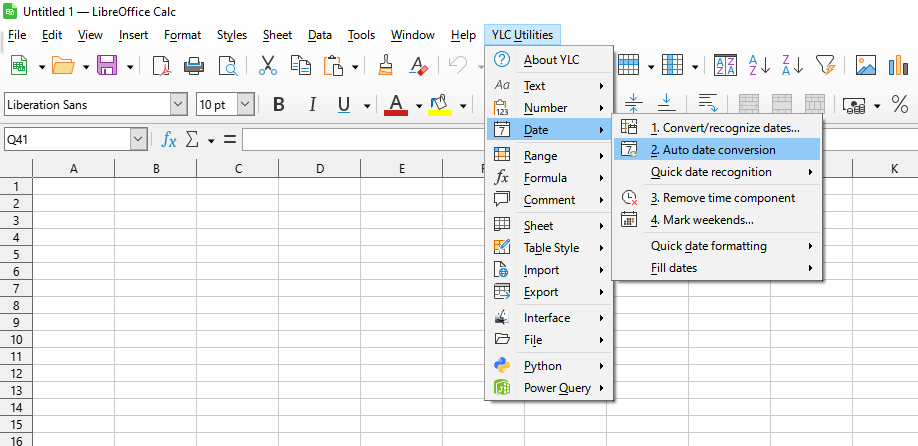
Click YLC Utilities > Date > Auto date conversion :

YLC Utilities > Date › Automatic date conversion

How much time will this save?

By using this tool, you are guaranteed to save time and effort. However, the actual time savings depend on how often you use Excel (Calc), the volume of data you work with, and how frequently you use this tool.

Download extension

You can use the utility Auto date conversion by installing the extension YLC Utilities.

After that, this function will be available in all files opened in Excel (LibreOffice Calc).


Additional keywords for this tool:
Auto date conversion, date recognition, text to date, date formatting

The YLC Utilities menu in LO Calc

The YLC Utilities menu in LO Calc

The YLC Utilities menu in Excel

The YLC Utilities menu in Excel