The AILOOKUP() function is a next-generation tool that uses Google Gemini artificial intelligence for intelligent data matching and filling. Unlike standard search functions, it can understand context and relationships between data.
Imagine you have datasets with different names for the same countries or companies and you need to automatically combine these lists using approximate (fuzzy) search. The AILOOKUP function analyzes the search array and fills the column with the most relevant data using the logic of large language models.
This function allows you to automate complex data cleaning and structuring tasks where traditional keyword search methods prove powerless.
You can also use the classic FUZZYLOOKUP() function, which performs algorithmic value selection with the minimum number of operations required to transform one text into another.
=AILOOKUP(LookupValue; LookupArray)
Using the AILOOKUP() function is very simple. You specify the value to search for and the reference array, and Excel (Calc) fills your tables using a neural network:
=AILOOKUP(LookupValue; Lookup Array)
We will have the following result:
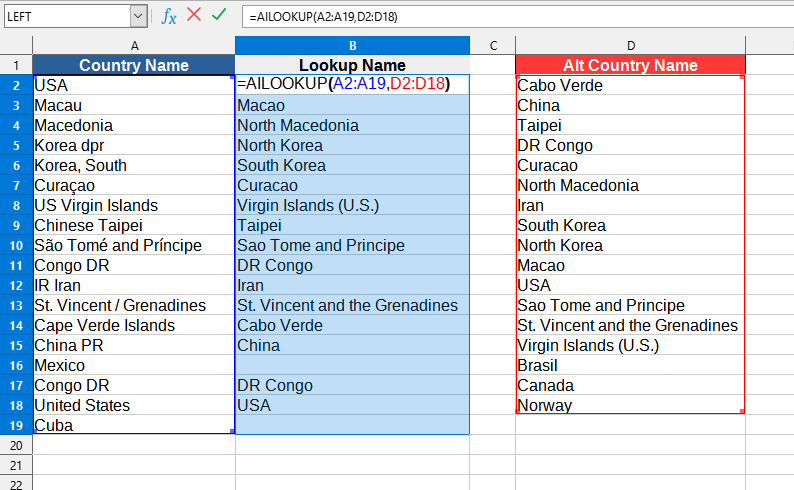
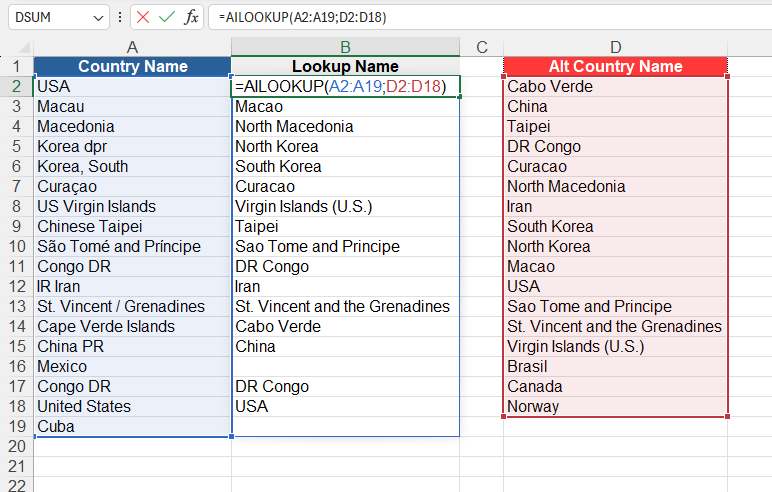
The following values are used in this example:
The AILOOKUP() function can work both in normal mode and as an array function.
To use as an array, simply enter the function in any cell, specifying the appropriate parameters. Then press Ctrl+Shift+Enter to enter the array formula, and LO Calc will automatically return the data table.
To select all cells associated with an array formula, simply select any cell in the array and press Ctrl+/.
If you need to convert an array formula to values - select the entire array and in the
You can use the AILOOKUP() function by installing the YLC Utilities extension.
After that, this function will be available in all files opened in Excel (LibreOffice Calc).

