The TABLETOCSV() function is designed to convert values from a table into plain text format. It automatically converts data, separating it according to CSV extension standards.
This result allows you to easily export tabular information for further use in other programs or databases.
=TABLETOCSV(Range)
The TABLETOCSV() function is easy to use. You just need to select a table or specify any range of cells with values and Excel (Calc) will automatically return the text in "csv" format:
=TABLETOCSV(Range)
We will have the following result:
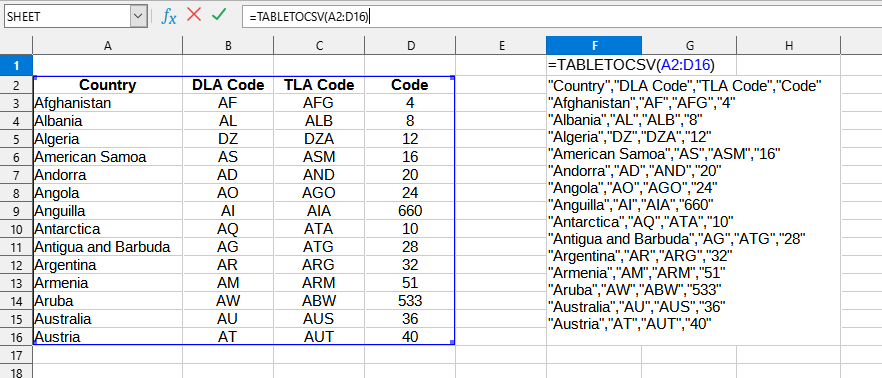
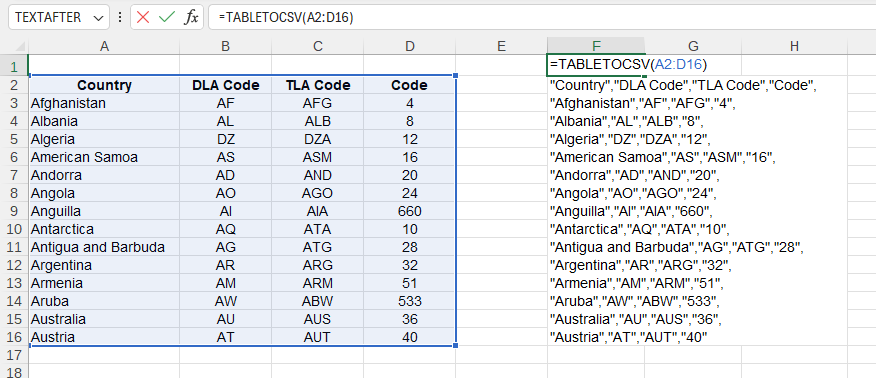
The following values are used in this example:
You can use the TABLETOCSV() function by installing the YLC Utilities extension.
After that, this function will be available in all files that are opened in Excel (LibreOffice Calc).

