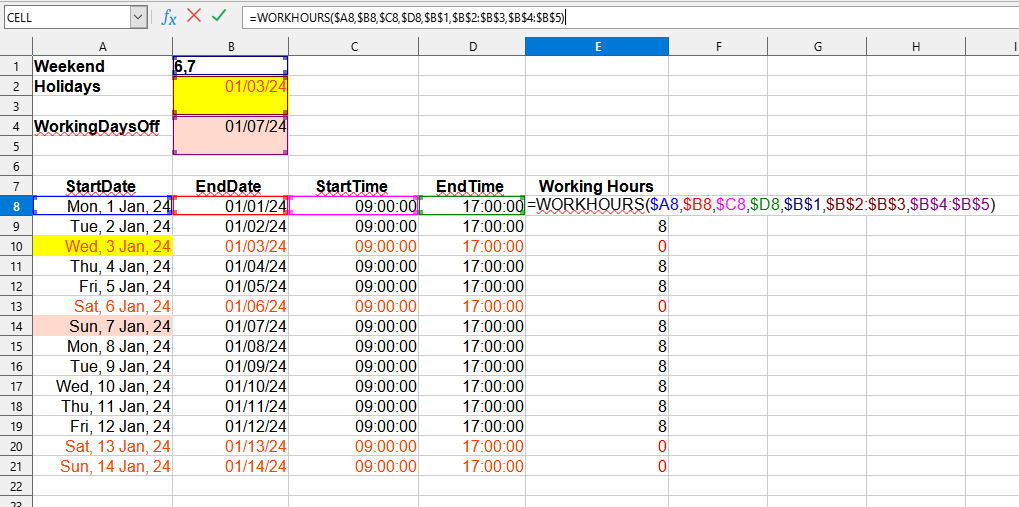
The WORKHOURS() function is designed to count the number of working hours between two specified dates, taking into account the working day period and specified holiday dates.
This function is a powerful tool for calculating working time, which will facilitate your work with tables and help you use your time more efficiently. Use it for quick and accurate determination of working hours in your project!
StartTime: Cell with the start time of the working day.
EndTime: Cell with the end time of the working day.
[Weekend]: Optional. A list of weekday numbers for standard weekend days in text format (for example, if the weekends are Friday and Saturday, specify: "5,6". By default, Saturday and Sunday are used as weekend days, i.e., the value "6,7". If "-1" is specified, all days will be working days.
[Holidays]: Optional. A reference to a range with holiday dates, which are considered as weekends, in addition to the weekend days specified in the previous parameter.
[WorkingDaysOff]: Optional. A reference to a range with dates that are exceptions to weekend days (for example, rescheduling working days due to holidays).
Example of Usage
Suppose you have a table with start and end dates of the calculation period (for example, the beginning and end of a week, month, quarter, year, etc.), as well as other necessary parameters. You just need to enter the WORKHOURS formula, and Excel (Calc) will automatically calculate the number of working hours: