Many people use colors to mark cells. Working with cell colors can facilitate understanding data in the workbook Excel (Calc).
Unfortunately, Excel (Calc) does not have built-in functions for using cell colors as conditions in formulas. Building formulas that only count or sum cells of specific colors can become truly cumbersome. This often leads to complex formulas that are prone to errors when making changes.
The function SUMBYFONTCOLOR() sums values in cells that have a specific font color.
=SUMBYFONTCOLOR(RangeToSum; SampleCell)
The SUMBYFONTCOLOR() function is easy to use. You just need to select the desired range of cells and specify the cell that contains the required color, and Excel (Calc) will automatically sum cells with the same color:
=SUMBYFONTCOLOR(RangeToSum; SampleCell)
We will have the following result:
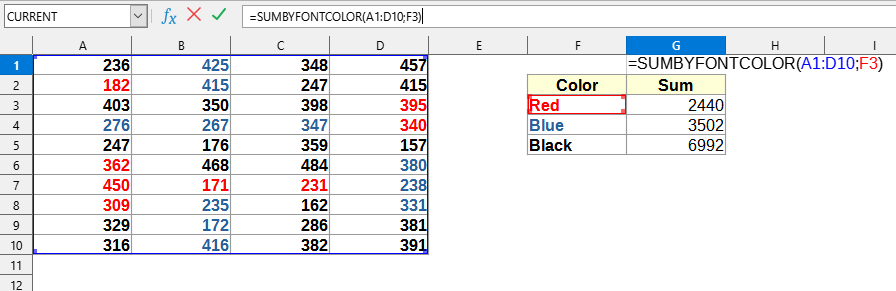
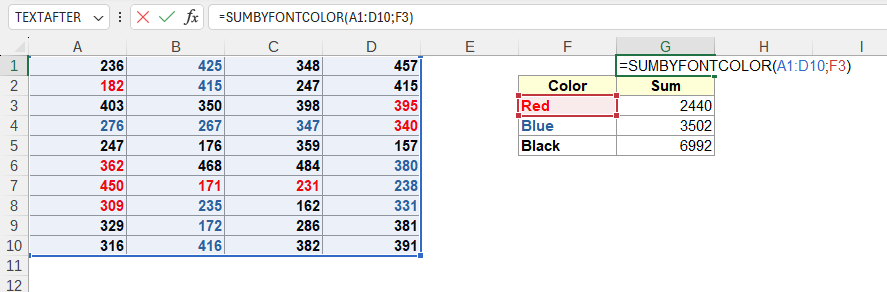
This example uses the following values:
Since Excel (Calc) recalculates a formula only if the value in a cell (to which it refers) changes, and not when colors change, some worksheet formulas do not always run to update. In this case, you can use the F9 or Ctrl+Alt+F9 key combination to update formulas in YLC Utilities.
You can use the SUMBYFONTCOLOR() function by installing the YLC Utilities extension.
After that, this function will be available in all files that will be opened in Excel (LibreOffice Calc).

