We all know the well-known VLOOKUP() function, which helps us combine data from different tables. However, this function has one significant drawback - it cannot combine similar values, meaning if there is a mistake in a word, there will be no match.
Let's imagine we have two lists. Both contain approximately the same elements, but they might be written slightly differently. The task is to find the most similar element from the second list for each element in the first list, i.e., to implement a search for the closest, most similar text.
The FUZZYLOOKUP function algorithm performs value matching based on the minimum number of changes required to transform one text into another.
If you want to match values using artificial intelligence (AI), then the AILOOKUP() function is available, which works based on Google's powerful language model "Gemini".
=FUZZYLOOKUP(LookupValue; LookupArray)
The FUZZYLOOKUP() function is easy to use. You just need to specify the value you are looking for and the search range, which contains approximate values, and Excel (Calc) will automatically find and return the required result:
=FUZZYLOOKUP(LookupValue; Lookup Array)
We will get the following result:
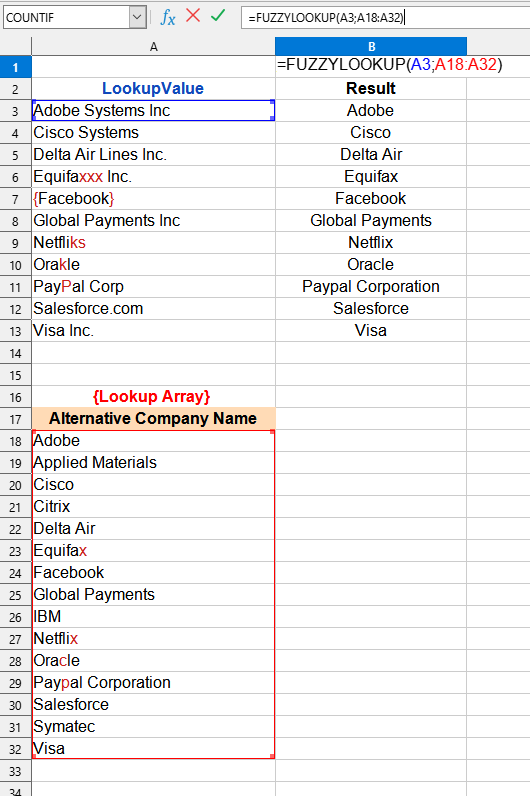

In this example, the following values are used:
You can use the FUZZYLOOKUP() function by installing the YLC Utilities extension.
After this, this function will be available in all files that will be opened in Excel (LibreOffice Calc).

