TOP

Hide/Replace private data

Text > Hide/Replace private data

This tool allows you to quickly hide or replace selected private data (such as names, phone numbers, email addresses, or other sensitive identifiers) with asterisks in selected cells. This eliminates the risk of accidental disclosure of confidential information when sharing data, creating screenshots, or demonstrating work documents.

The tool transforms the original data, for example, "John Doe", into "John ******", masking it for anonymization. It is ideal for creating test datasets or publishing examples without compromising privacy.


Screenshot

Text > Hide/Replace private data

After applying:

Text > Hide/Replace private data

Launching this tool

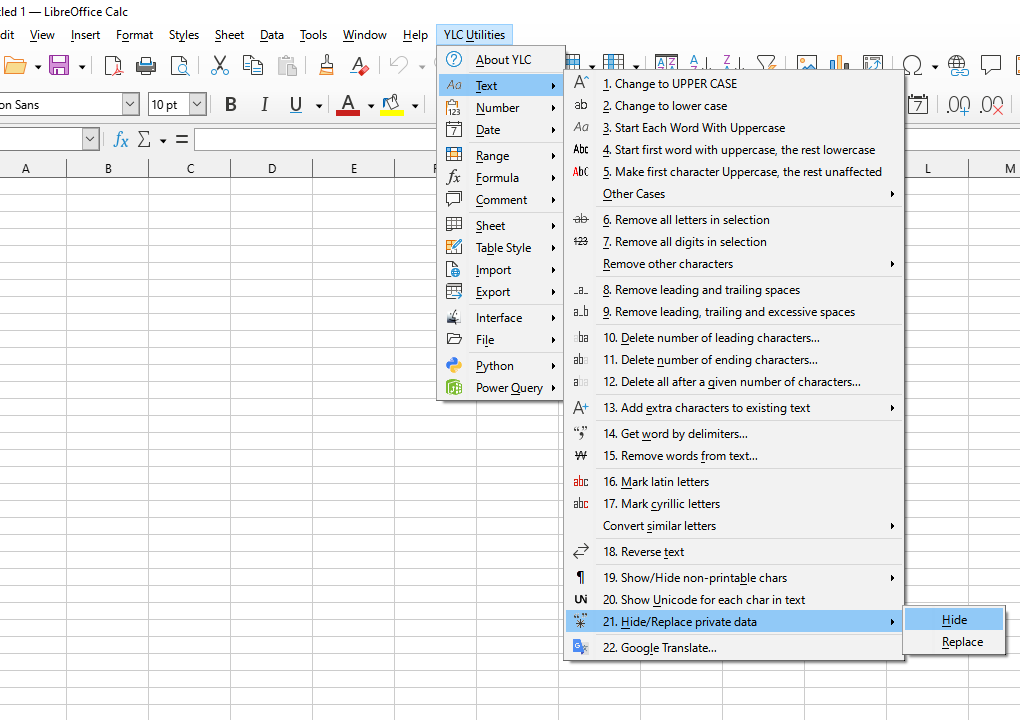
Click YLC Utilities > Text > Hide/Replace private data :

YLC Utilities > Text › Hide/Replace private data

How much time will it save?

By using this tool, you are guaranteed to save time and effort. However, the actual time savings depend on how often you use Excel (Calc), the volume of data you work with, and how often you use this tool.

Download the extension

You can use the Hide/Replace private data utility by installing the YLC Utilities extension.

After that, this function will be available in all files that will be opened in Excel (LibreOffice Calc).


Additional keywords for this tool:
Data anonymization, hide data, sensitive data, masking, replace with asterisks

The YLC Utilities menu in LO Calc

The YLC Utilities menu in LO Calc

The YLC Utilities menu in Excel

The YLC Utilities menu in Excel